Picture this: A single broken link on your site could be costing you hundreds of visitors, tanking your rankings, and signalling to Google that your site is outdated. In our 2025 audit, we found that 68% of websites had broken links draining their SEO potential, and fixing them became the fastest, most cost-effective ranking boost we’d ever seen. Here’s how to find, fix, and prevent broken links to reclaim lost traffic and rankings. But before that, let’s understand what broken links are.
What Are Broken Links in SEO?
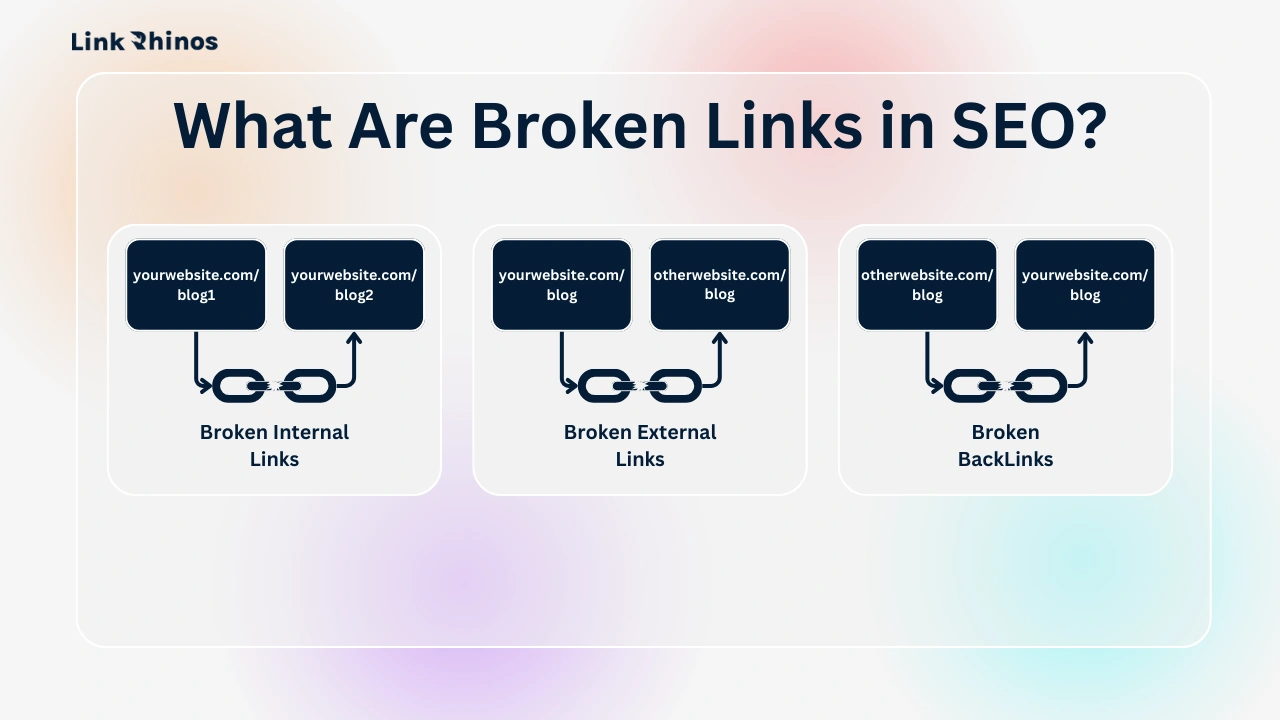
In SEO terms, broken links are hyperlinks that point to pages that no longer exist or fail to load properly. When a user or search engine clicks these links, they usually land on a 404 error page or a dead end instead of useful content.
From Google’s perspective, broken links are a strong signal that a website may be outdated, poorly maintained, or unreliable—and that’s not the kind of signal you want to send in 2026.
Common Types of Broken Links
Broken links show up in more ways than most site owners realize:
- Broken Internal Links
Links pointing to pages within your own website that were deleted, renamed, or moved without a redirect. - Broken External Links
Links leading to other websites that no longer exist, changed their URLs, or removed the referenced content. - Broken Backlinks
External websites linking to a page on your site that has been deleted or returns a 404—silently killing valuable link equity.
Why Search Engines Care So Much
Search engines aim to deliver the best possible user experience. When Googlebot repeatedly encounters broken links on your site, it sees:
- Poor navigation structure
- Wasted crawl budget
- Reduced trust in your content quality
Over time, this can lead to lower rankings, slower indexing, and lost authority, especially if broken links appear on important or high-traffic pages.
The Simple Truth
If links are the roads of the internet, broken links are collapsed bridges. Users can’t move forward, search engines can’t crawl efficiently, and your SEO performance suffers quietly in the background.
That’s why fixing broken links isn’t just technical cleanup—it’s foundational SEO hygiene, and one of the easiest wins you can make before investing in new content or backlinks.
Why Broken Links Are SEO Kryptonite
Broken links (404 errors) occur when a page is moved, deleted, or mistyped. They sabotage your SEO by:
- Harming User Experience: Visitors hit dead ends and bounce.
- Wasting Crawl Budget: Googlebot wastes time on dead pages instead of indexing valuable content.
- Killing Link Equity: Passing no SEO value to linked pages.
Step 1: Find Broken Links Like a Pro
Tools to Use:
- Google Search Console
- Go to Coverage > Excluded to find “404 (Not Found)” errors.
- Screaming Frog
- Crawl your site → Filter by “Broken Links” (Client: Fixed 112 broken links in 1 hour using this).
- Ahrefs/SEMrush
- Use “Site Audit” to detect broken internal/external links.
- Broken Link Checker
- Free plugin for WordPress users.
For a deeper dive into using these tools effectively, check out our guide on how to use Ahrefs, Moz, and Link Rhinos together.
Step 2: Prioritize High-Impact Fixes
Not all broken links are equal. Focus on:
- High-Traffic Pages: Broken links on popular posts hurt more.
- Backlinked Pages: Pages with external backlinks are losing equity.
- Key Conversion Paths: Checkout pages, lead magnets, or pricing sheets.
Step 3: Fix Broken Links (3 Solutions)
Method 1: Redirect with 301s
- When: The page has moved or been renamed.
- How: Use .htaccess (Apache) or plugins like Redirection (WordPress).
- Code: Redirect 301 /old-page/ https://yoursite.com/new-page/
Method 2: Update the Link
- When: The target page still exists, but the URL has changed.
- How: Manually correct the link in your CMS.
Method 3: Remove the Link
- When: The linked content is irrelevant or gone.
- How: Delete the link or replace it with a relevant alternative.
Step 4: Prevent Future Broken Links
- Use Redirect Plugins: Automatically redirect deleted pages.
- Audit Quarterly: Schedule Screaming Frog crawls every 3 months.
- Monitor Backlinks: Tools like Ahrefs alert you when external sites link to broken pages.
- Update Content: Replace outdated resource links annually.
How Broken Links Tie Into Your Overall Strategy
Fixing broken links optimizes internal linking, but external backlinks drive authority. For a deeper dive, read: Internal vs. External Links: What’s the Real Difference?. And if you discover toxic links during your audit, you may need to disavow them.
How Link Rhinos Complements Your Fix Efforts
While fixing broken links stops leaks, building high-quality backlinks fills your site with authority. Link Rhinos accelerates this by:
- Connecting You with Vetted Partners: Secure guest posts on authoritative sites to replace lost link equity.
- Automating Outreach: Save hours finding collaborators with our templated pitch system.
- Ensuring Link Health: Built-in alerts flag toxic or broken links in your backlink profile.
Your Checklist to Fix Broken Links
- Crawl: Use Screaming Frog or Google Search Console.
- Prioritize: Fix broken links on high-traffic pages first.
- Redirect: Implement 301s for moved content.
- Build: Use Link Rhinos to replace lost equity with authoritative backlinks—and follow our guest posting strategies to stay penalty-free.
Conclusion
Broken links aren’t just errors—they’re opportunities. By auditing, redirecting, and pairing fixes with strategic backlinks via Link Rhinos, you’ll transform site health into rankings, traffic, and trust.
Ready to Fix and Flourish?
👉 Try Link Rhinos to repair your site’s foundation and build an unshakable backlink profile.
Why Link Rhinos?
- Quick Setup: Start fixing and building in minutes.
- Penalty-Proof: All partnerships follow Google’s guidelines.
- Transparent Results: Track traffic and DA growth in real time.
Don’t let broken links bleed your SEO—turn them into your comeback story. 🚀