You’ve published the content. Done the keyword research. Maybe even picked up a few backlinks. But key pages are stuck on page two, and your content archive keeps growing without any of it compounding into rankings.
The fix is almost always the same: your pages aren’t linking to each other on purpose. Internal links are the one ranking signal entirely within your control – no outreach, no waiting, no DR requirements. You can place one today, and Google can act on it in days.
This guide covers how to build internal links for SEO systematically – not as an afterthought – including the internal linking strategy that works for SaaS sites in the DR 15–40 range, and exactly how to add internal links in WordPress using three methods that require no plugins.
What Is Internal Link Building
Internal link building is the practice of strategically placing hyperlinks between pages on the same domain to distribute PageRank, establish topical hierarchy, and guide crawlers through your content architecture.
Most sites treat it like decoration – a “related posts” widget dropped at the bottom of every article. If you’re trying to understand what is internal link building in practice versus in theory, that’s the clearest example of what it isn’t. That widget approach is noise.
Effective internal link building has two non-negotiable requirements most sites skip: intent (this link exists to transfer authority to a specific high-value page, not because the topics loosely overlap) and anchor text that reflects the target page’s primary keyword – not “read more,” not “this article,” not “learn more here.”
A 2023 Ahrefs study found that 16.5% of pages across average websites have zero internal links pointing to them. Those orphan pages get crawled less frequently, rank worse, and are essentially invisible to Google until something links to them. On a 200-page SaaS blog, that’s potentially 33 pages generating zero compounding authority.
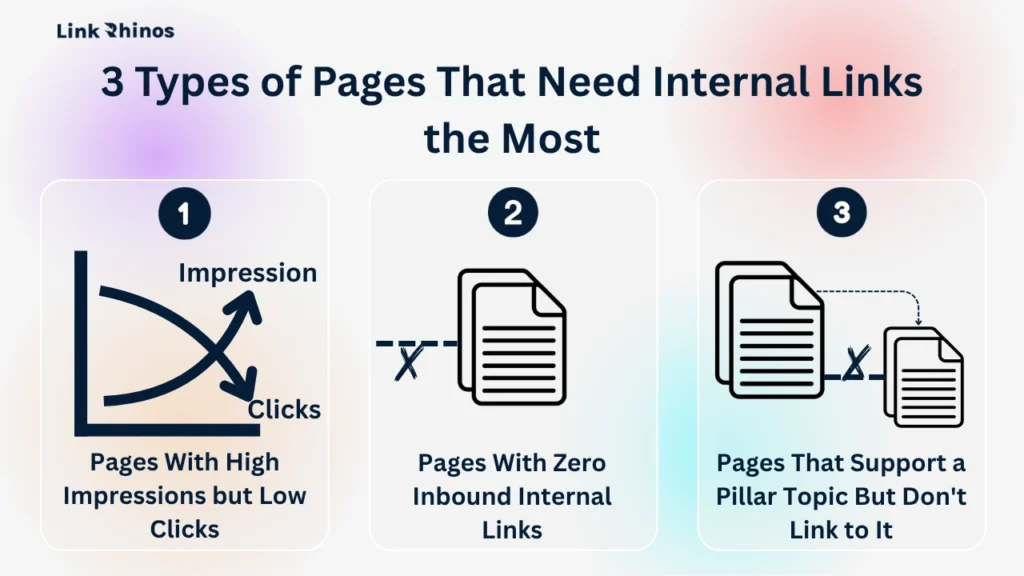
3 Types of Pages That Need Internal Links the Most
Before placing a single link, map your content into two parts: pillar pages (high-value targets you want ranking – product pages, core solution guides, high-intent posts) and supporting pages (articles that should be funnelling authority upward toward those pillars).
Run a crawl with Screaming Frog (free up to 500 URLs) or Ahrefs Site Audit. Then filter for three signals – each one points to a different set of pages that need immediate attention.
Pages With High Impressions but Low Clicks
These are pages Google is already surfacing for relevant queries, but users aren’t clicking through to them. A targeted internal link pointing at them from a high-authority page can push them over the edge – more crawl frequency, stronger relevance signal, better click-through rate. How to build internal links for seo
Pages With Zero Links
These are your orphan pages, and they are your first priority. Every day they sit unlinked is a day Google has a weaker justification to crawl them. No internal links mean no authority flows in, regardless of how strong the content is.
Pages That Support a Pillar Topic But Don’t Link Back to It
If you have a supporting post targeting a keyword that feeds into a pillar topic, and it doesn’t link to that pillar, you’re leaving authority on the table with every new visit. This is a missed transfer that repeats itself silently with every publish.
For most SaaS sites, your pillar pages are product feature pages, your pricing page, and two or three high-intent solution posts. Every supporting post in your content library should link to at least one of them.
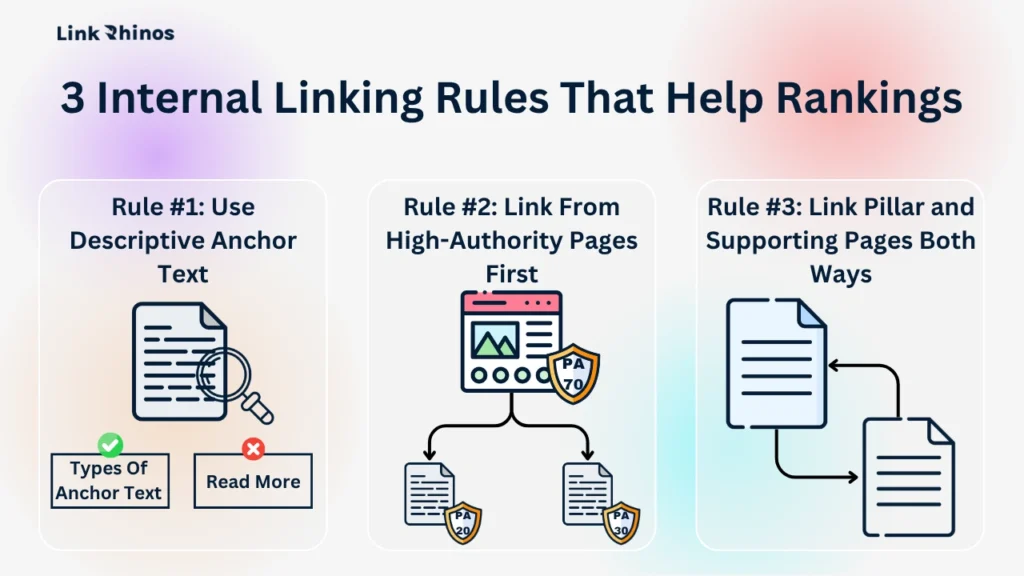
3 Internal Linking Rules That Help Rankings
The best internal linking strategy isn’t about placing more links – it’s about placing the right ones with intention. Most sites that try to build internal links for SEO do it inconsistently: a few links here, a widget there, no system behind it. The sites that see measurable ranking lifts follow three rules on every post, every time.
These aren’t concepts to keep in mind. They’re decisions to build into your publishing workflow before you hit publish.
Rule #1: Use Descriptive Anchor Text
Google uses anchor text as a direct relevance signal for the linked page. “Internal link building guide” tells Google exactly what the destination covers. “Click here” tells it nothing. Keep anchor text two to five words, match the destination’s primary keyword, and understand your anchor text types and how they’re weighted before doing bulk updates across old posts.
Rule #2: Link From High-Authority Pages First
A link from a page with 40 referring domains passes more authority than one from a post with none. Pull your top pages in Ahrefs Site Explorer, sort by referring domains, and verify they’re pointing toward your most important conversion targets. If they’re not, that’s your fastest win – no new content required.
Rule #3: Link Pillar and Supporting Pages Both Ways
If your pillar page links to a supporting post, that supporting post should usually link back to the pillar. Not as a reciprocal trick – but because users on the supporting post are likely interested in the pillar, and the topical signal reinforces itself. Done right, reciprocal linking strengthens both crawlability and topical relevance without triggering any penalties.
How to Add Internal Links in WordPress (Three Methods)
You don’t need a plugin to add internal links in WordPress. Three methods cover every situation – pick whichever fits the editor you’re already using.
Method 1: Block Editor (Gutenberg)
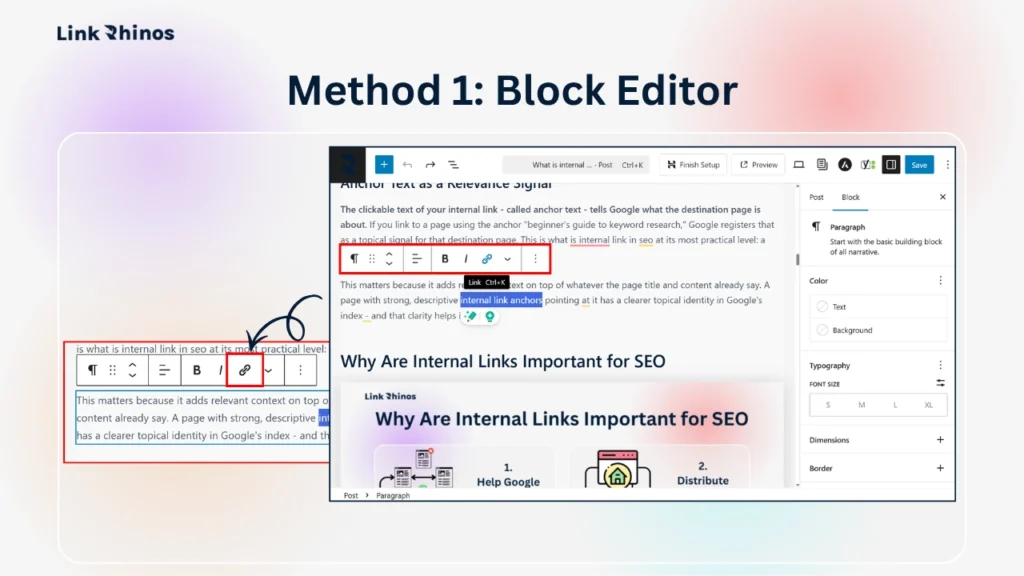
- Step 1: Select the text you want to link
- Step 2: Click the chain/link icon in the pop-up toolbar
- Step 3: Paste the page URL directly into the link field
- Step 4: Press Enter to apply the link
This is the fastest method for most users and requires zero setup.
Method 2: Classic Editor
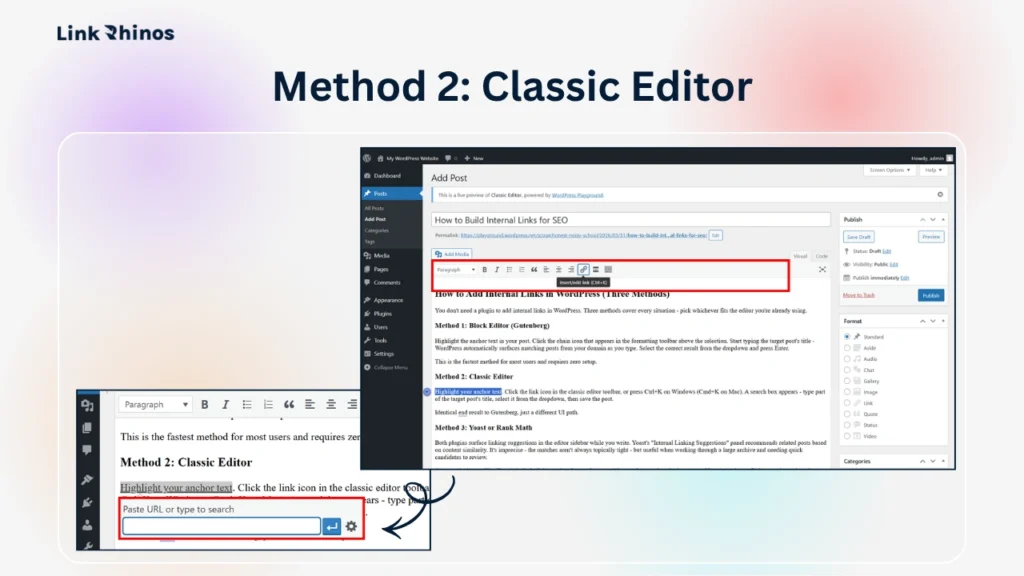
- Step 1: Select the text you want to link
- Step 2: Click the link icon in the top toolbar (or press Ctrl+K on Windows / Cmd+K on Mac)
- Step 3: Paste the page URL directly into the link field
- Step 4: Click Add Link to save
Identical end result to Gutenberg, just a different UI path.
Method 3: Yoast or Rank Math
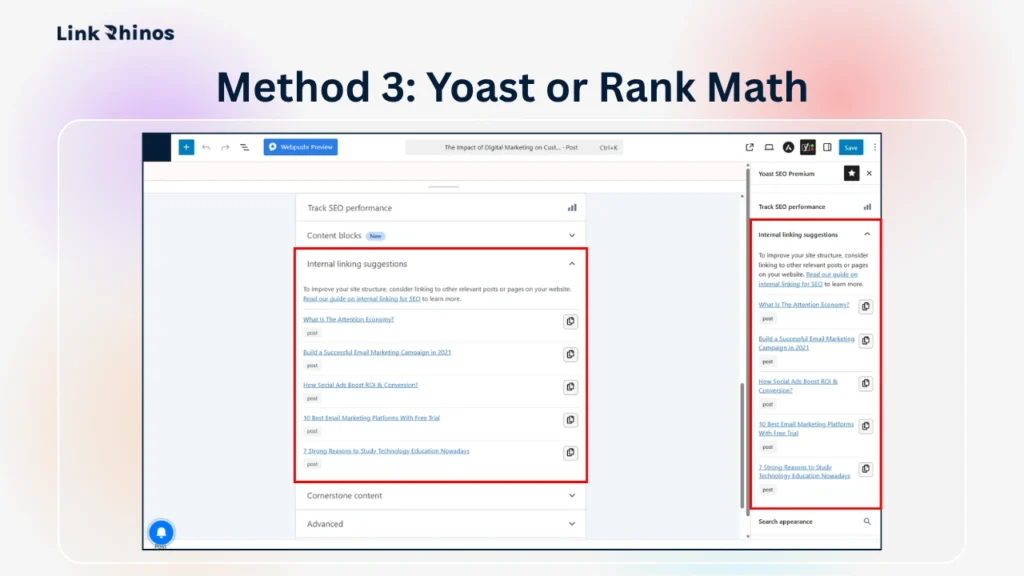
Both plugins suggest internal link candidates – they don’t place the links for you. Use their suggestions to find relevant URLs, then add the link manually using Method 1 or 2.
Yoast SEO
- Step 1: Open any post in the editor
- Step 2: Scroll to the Yoast SEO meta box below the content area
- Step 3: Click the Internal Linking Suggestions tab
- Step 4: Browse the suggested posts listed
- Step 5: Copy the URL of a relevant post and add it to your content using Method 1 or 2 above
Rank Math
- Step 1: Open any post in the editor
- Step 2: Click the Rank Math icon in the top right of the toolbar
- Step 3: Open the Link Suggestion tab in the sidebar panel
- Step 4: Browse the suggested posts – Rank Math analyses your content in real time to surface relevant options
- Step 5: Copy the URL of a relevant post and add it to your content using Method 1 or 2 above
Adding internal links in WordPress becomes significantly faster once you have a running list of your pillar pages and their URLs bookmarked – worth setting up before your next publish session.
5 Internal Linking Errors That Quietly Hurt Rankings
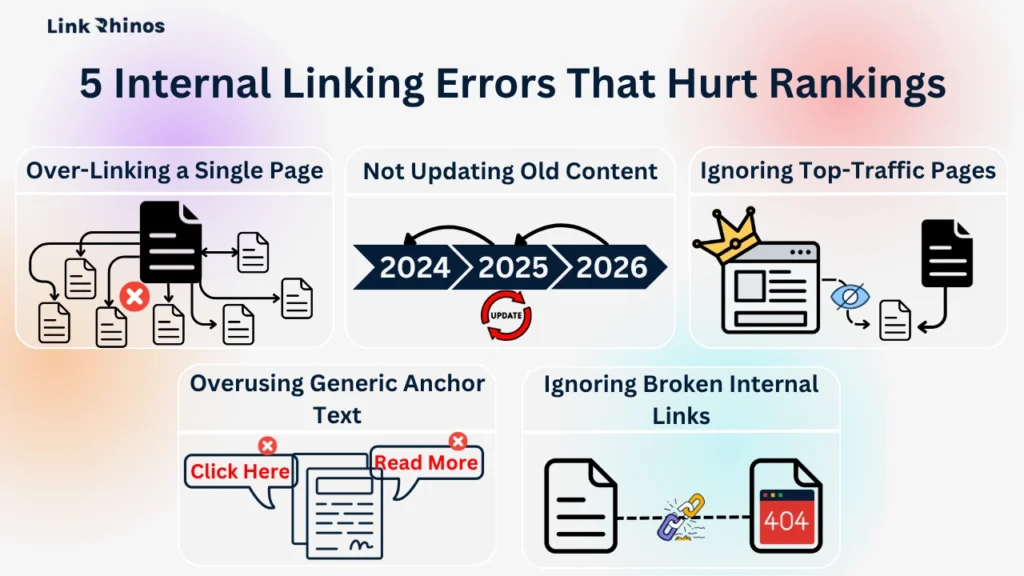
Most internal linking problems aren’t dramatic. They’re quiet, compounding, and easy to miss until you specifically look for them.
Over-Linking a Single Page
Google dilutes the value of each individual link when a page contains 50 or more internal links. Aim for three to seven per 1,000 words – enough to pass authority without devaluing each placement. If you’re linking to the same destination six times in one post, pare it back to two.
Overusing Generic Anchor Text
This is the most common error and one of the easiest to fix. “Read more” and “click here” tell Google nothing about the destination. Audit your top ten most-linked pages and replace generic anchors with descriptive, keyword-matched phrases. This change alone can produce visible ranking movement within four to six weeks.
Ignoring Top-Traffic Pages
Your highest-traffic posts are your best internal link real estate. If they aren’t pointing toward your product pages or core pillar content, you’re leaving authority sitting idle on pages that already have traction. Check these before touching anything else.
Not Updating Old Content
Every new post you publish should trigger a quick review of two or three existing posts where a link to the new content makes sense. This is the same discipline required when you scale link building without losing quality across a growing archive – a repeatable system beats one-off fixes every time.
Ignoring Broken Internal Links
A broken internal link doesn’t just waste PageRank – it signals to crawlers that the site is poorly maintained. Run a crawl quarterly and fix broken links as soon as they surface. Screaming Frog flags these in under five minutes on most sites.
How to Build Internal Links for SEO
Step 1: Audit Your Orphan Pages
Run Screaming Frog (free up to 500 URLs) or Ahrefs Site Audit. Export all pages with zero inbound internal links. These are your first linking targets – prioritise pages that already have strong content and organic impressions but no authority flowing in. Link to each one from at least two relevant existing posts before publishing anything new.
Step 2: Map and Connect Your Pillar Pages
Identify the two or three pages you most want to rank. Check every supporting post published in the last six months – each one should link to at least one pillar page using descriptive anchor text. Update the posts that don’t. This step takes 30–60 minutes, and the impact compounds from day one.
Step 3: Fix Anchor Text on Your Top Ten Posts
Open your ten most-linked pages in Ahrefs or Google Search Console. Find every internal link using generic anchor text and replace it with a descriptive two-to-five-word phrase that matches the target page’s primary keyword. Do this before publishing anything new – it’s a higher-ROI move than writing a new post with no internal link plan attached.
Bottom Line
Once you know how to build internal links for SEO with a real system behind it – not random placements – everything compounds faster. Fix orphan pages, upgrade anchor text, enforce the best internal linking strategy consistently, and you’ll concentrate ranking authority exactly where it drives revenue.

Build the internal structure properly first. Then the external links you earn will have somewhere to land.
Internal links distribute authority within your site – but they only compound when strong external backlinks are reinforcing your domain. LinkRhinos matches SaaS sites with vetted, niche-relevant link partners so you can build both without cold outreach. → linkrhinos.com/register.